
Cleo/Little Girl Donation Refund
If you donated to the RSVP facebook fundraiser for Cleo/Little Girl and want to request a refund, follow the steps below.
On Your Facebook Page:
- Click on the dropdown arrow symbol on the far right of the blue menu bar

- Click Payment History
- Click on your donation
- Scroll to bottom
- Click Get Payments Support
- Click I donated to a fundraiser
Click Refund for my donation
Click Other reason
Select the donation from dropdown
Detail: Surgery cancelled
Click Send
You should receive a confirmation.
Click on Support Inbox on the Settings left sidebar.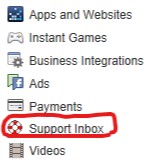
Click here to contact RSVP for additional information.